

Email Intelligence
Your inbox organized. Your team focused on decisions, not data entry.
The Inbox Problem
Your operations team starts every morning the same way: open the inbox, scroll through 100+ emails, and start sorting. This one is a new submission. That one is a follow-up on missing info. Here is a carrier quote buried in a thread from last week. And somewhere in there, a broker sent documents three days ago that nobody noticed.
The inbox is where submissions go to get lost. Emails arrive from brokers, carriers, and internal teams — all mixed together, no consistent format, no reliable subject lines. Your team manually reads each one, figures out what it is, finds the right submission folder, and updates a spreadsheet. When something slips through, a broker calls asking why nobody responded to their application.
This is not a volume problem. It is an intelligence problem. The emails contain everything your team needs — insured names, policy details, attached forms, carrier decisions. But extracting that information and connecting it to the right submission takes human attention, and human attention does not scale. Every hour your team spends sorting email is an hour they are not spending on underwriting, broker relationships, or placing business. The inbox is not just a bottleneck — it is a cap on your revenue capacity.
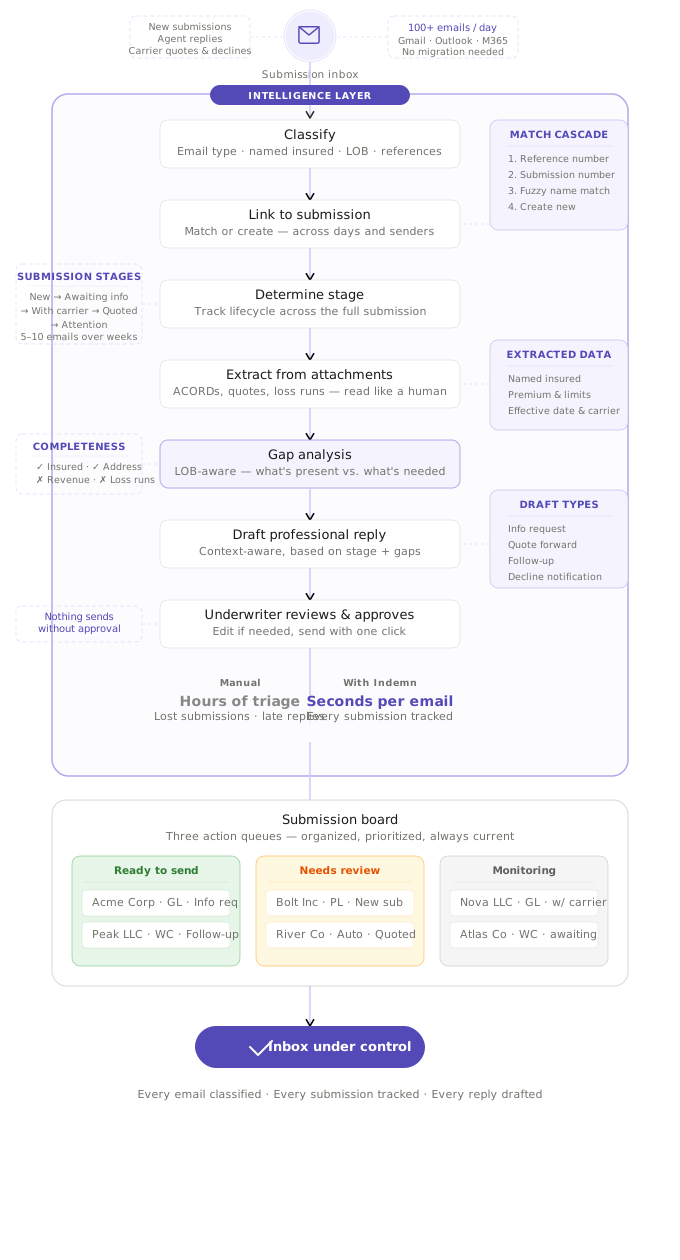
The fix is the Inbox Associate — an intelligence layer that sits between your inbox and your workflow. It reads every email as it arrives. It classifies it — new submission, info response, carrier quote, follow-up needed. It links it to the right submission automatically. It reads PDF attachments and extracts structured data. It identifies what is missing. And it drafts the reply your team would have written anyway — every draft marked for human review before it leaves your inbox. Your team stays in control of every communication.
See It In Action
Pick a submission. Watch the inbox organize itself.
Five Steps. Every Email.
From unread to organized in seconds.
Classify
Read the email, determine type, extract insured name, LOB, and references
Link
Match to existing submission by reference, name match, or create new
Stage
Determine lifecycle position based on most recent email type
Extract
Read PDF attachments — ACORD forms, quotes, loss runs — pull structured data
Draft
Generate professional replies — info requests, quote forwards, follow-ups
No rules. No templates. The system reads and figures it out.
Drafts That Write Themselves
Every reply follows your voice, addresses specific gaps, and references the right submission.
Info Request
Identifies exactly what's missing for each line of business and drafts a clear, itemized request.
"To move forward with the GL quote, I need: annual revenue, 3-year loss history..."
Quote Forward
When a carrier quote arrives, extracts premium, limits, and terms, then drafts a summary for the broker.
"Great news — GL: $4,850/year, $1M occ / $2M agg..."
Follow-Up
Tracks how long since info was requested. Auto-generates a gentle follow-up after your configured threshold.
"Following up on my request from last week..."
Decline Notification
When a carrier declines, drafts a professional notification with the reason and suggested next steps.
"Unfortunately, the carrier has declined due to loss history..."
Works With Your Systems
Integrate with what you have, or let us handle everything.
Standalone
We build and host everything — your product, your branding, our infrastructure. Go live in weeks, not months.
AMS Integration
Connect to your agency management system. Policies, customers, and commissions sync automatically. No double entry.
Carrier Portal
We automate workflows directly in carrier systems — quoting, binding, document retrieval. Even complex multi-step portals.
Frequently Asked Questions
Which email providers does this work with? +
Email Intelligence connects to any provider that supports IMAP or API access — Gmail, Microsoft 365, and custom mail servers. We monitor your inbox in real time and process emails as they arrive. No forwarding rules, no CC addresses. We read from your existing inbox.
What types of documents can it extract data from? +
ACORD forms (125, 126, 130, 140), carrier quote letters, loss runs, binders, policy declarations, and general PDF attachments. The Associate reads the document structure, not just OCR text, so it handles scanned forms, multi-page documents, and inconsistent formatting.
How fast does it process an email? +
Most emails are classified and linked within 30 seconds of arrival. PDF extraction takes slightly longer depending on document length — typically under two minutes for a full ACORD application. Drafts are generated immediately after extraction completes.
Does a human still approve outgoing emails? +
Always. Every draft is marked 'Suggested — Review and Send.' Your team reviews, edits if needed, and hits send. The Associate never sends an email without human approval. Over time, most teams find they send 85% of drafts without changes.
What happens with emails that aren't submissions? +
The Associate recognizes non-submission emails — newsletters, internal messages, spam, personal correspondence — and skips them. Only emails related to insurance submissions, quotes, and policy servicing enter the pipeline. Everything else stays in your inbox untouched.
Can it handle submissions with multiple lines of business? +
Yes. A single submission can span GL, WC, auto, property, and umbrella. The Associate tracks each line independently within the same submission — separate gap analysis, separate carrier quotes, unified timeline. Multi-LOB submissions are the norm, not the exception.

Let's Organize Your Inbox
Every agency's email workflow is different — different carriers, different volume, different team structure. We partner with you to configure an intelligence layer that fits how your operation actually works.